Dalton Project
University of California
Dept. of Computer Science
Riverside, CA 92521
[email protected]

This page is still under construction and at the moment intended for internal use. You are welcomed to look at it, but we do NOT provided any support. We do not , nor does the University of Califronia at Riverside, provide any kind of warrantee for anything you read or download from this page.

Introduction to LEON

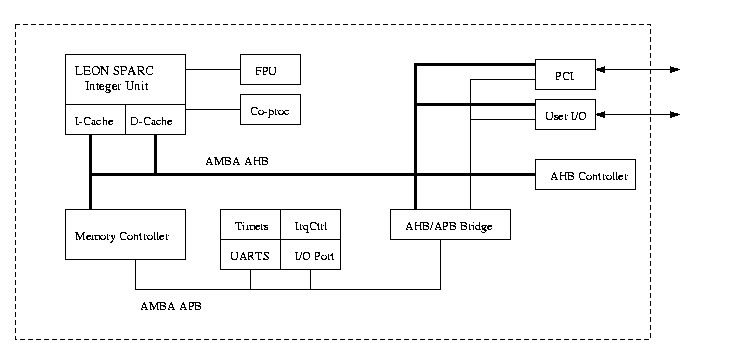
LEON is a 32-bit sparc-like open source processor core developed at the European Space Agency control and data systems division. LEON has a 5 stage RISC processor with cache, interrupt controller, external memory controller, UART, Amba bus, and has seperate I-cache and D-cache. It is fully synthesizeable (we use Synopsys but the original code supports several other tools as well). The LEON VHDL model is provided under the GNU LGPL liscense.

Block Diagram


Synthesis, Simulation, and Power Evaluation

We have modified the some of the code obtained from Gaisler Research to conform to the tools we have available. Several scripts/makefiles are included to streamline the process.

Behavior Model

  1. Makefile is provided in source/ to analyze all relevant files, run "make beh"
  2. run "vhdldbx" to simulate


Gate level Model
  1. A script is provided in syn/ to synthesize the model to gate level. In the dc_shell run leon.dcsh (i.e. run "dc_shell -f leon.dcsh")
  2. A file called leon_gate.vhd will be produced. You will need to modify some of this code since we do not have the necessary libraries. For each instance of a syncram component you will need to map it back to a generic componet. A sample of the modified lines are outlined in red. Notice in the modified code when you use the generic map you need to match the number you are mapping to the number listed in the entity name. For example, if you have a syncram_abits7_dbits25_0 then you will have a generic map(7,25). If you have a syncram_abits9_dbits32_0 then you will have a generic map(9,32).

    SAMPLE OUTPUT AFTER SYNTHESIS
    entity syncram_abits7_dbits25_0 is
        port( address : in std_logic_vector (0 to 6); clk : in std_logic;
               datain : in std_logic_vector (0 to 24); dataout : out
               std_logic_vector (0 to 24); enable, write : in std_logic);
    end syncram_abits7_dbits25_0;

    architecture SYN of syncram_abits7_dbits25_0 is

        component generic_syncram_param_1_2
              port( address : in std_logic_vector (0 to 6); clk : in std_logic;
                    datain : in std_logic_vector (0 to 24); dataout : out
                    std_logic_vector (0 to 24); enable, write : in std_logic);
        end component;

    begin

    u0 : generic_syncram_param_1_2 port map( address(0) => address(0), ....
    SAMPLE MODIFIED OUTPUT
    entity syncram_abits7_dbits25_0 is
        port( address : in std_logic_vector (0 to 6); clk : in std_logic;
              datain : in std_logic_vector (0 to 24); dataout : out
              std_logic_vector (0 to 24); enable, write : in std_logic);
    end syncram_abits7_dbits25_0;

    architecture SYN of syncram_abits7_dbits25_0 is

        component generic_syncram
           generic ( abits : integer := 10; dbits : integer := 8 );
           port( address : in std_logic_vector (0 to 6); clk : in std_logic;
                  datain : in std_logic_vector (0 to 24); dataout : out
                  std_logic_vector (0 to 24); enable, write : in std_logic);
        end component;

    begin

    u0 : generic_syncram generic map(7,25) port map( address(0) => address(0), ...


  3. The modified leon_gate.vhd needs to be moved to ../source/leon/leon_gate.vhd.
  4. Next we analyze the files using the Makefile provided in source/ by running "make syn"
  5. Run "vhdldbx" to simulate, your top level entity is TBDEF


Overall Power Analysis
The overall power analysis will caputre a single number to represent the power consumption of LEON given a specific test bench. There is a default test bench provided with LEON. If you want to change this test bench see the directions provided in the cross compiliation section.
  1. you will first need a run script to indicate how long the test bench will run for. This number is dependent upon the application you are running. A default one is provided in run.scr
  2. you need to analyze the necessary files, since we are looking at the gate level we can used the Makefile provided in source/ by running "make syn".
  3. now we simulate it to produce a toggle file "vhdlsim -i run.scr -togfile leon_tc -power_stats TBDEF". From this command we will produce a toggle file called leon_tc
  4. We now convert the toggle file format using sim2dp with the following command, "sim2dp -vss leon_tc > leon_sa.scr" The new file is called leon_sa.scr
  5. Now that we have a readable toggle file we will now use dc_shell to analyze it. A script is provided in scripts/ so we run "dc_shell -f power.scr". After this step completes you will have the power consumption of LEON.


Architectural Power Analysis
PENDING

Cross-compiler

For the tools we have available we had to install Cywin. This may not be necessary to run the cross compiler, dependng on the environment available.

  1. A Makefile is provided to generate the necessary files. You will need to change the target to the name of the program which you want to compile.
  2. The makefile provides you with ram.dat and rome.dat. These files need to be moved into the source/tsource/ directory.
  3. You can now analyze it and simulate LEON.

Test Cases

Loading the application

  • For all test cases, you will need to ensure the rome.dat is included in the tsource/ directory. This file should already be present in tsoure/, however you can download it if needed. This file will load the application stored in the ram.dat file.
  • To run the actual application copy the appropriate ram.dat file (generated or downloaded) into leon/tsource. Make sure you have the proper LEON configuration.
Configuring the UART
  • The file leon/device.vhd contains a single selection that denotes the configuration of leon that is to be used for simulation. Currently, there are two configurations that should be used, fpga_2k2k and fpga_2k2k_ud. The fpga_2k2k configuration should be used when running programs that do NOT have any output, e.g. printf(), or that have output you do not wish to view. If you want to view the output from your program, you should use the fpga_2k2k_ud configuration. To select the appropriate configuration, you need to modifiy the leon/device.vhd as shown below:
leon/device.vhd configuration for programs with output
-- constant conf : config_type := fpga_2k2k;
   constant conf : config_type := fpga_2k2k_ud;
-- constant conf : config_type := fpga_2k2k_v8;
...
leon/device.vhd configuration for program without output
   constant conf : config_type := fpga_2k2k;
-- constant conf : config_type := fpga_2k2k_ud;
-- constant conf : config_type := fpga_2k2k_v8;
...


Available test cases

Name RAM File Description
leon_test.tar.gz ram.dat Default test program provided with LEON to test processor components.
hello.tar.gz ram.dat Simple Hello World program.
paranoia.c rom.dat pending

Downloads

File Description
leon-2.3.5.tar.gz The original Leon VHDL model obtained from Gaisler Research.
leon-2.3.5.pdf Documentation on LEON
leon.tar.gz The model currently being used for research

References