
| Hitachi Data Systems Hitachi, Ltd. | |
|
|
|
Enabling PollingThe home page of the RACC application has a status indicator and a single button for controlling the operation of the application. 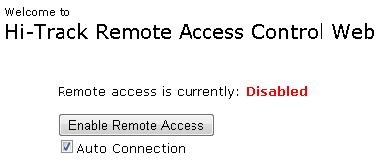
After you install and configure the RACC application, the system will not yet be actively polling and the home page should look like the graphic to the right. Click the button to enable polling and the status message will change as well as the text on the button. 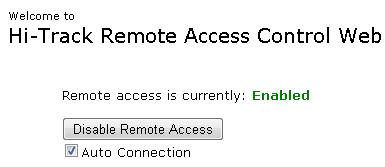
The enable/disable button is essentially a toggle switch for turning polling on or off. However, if a tunnel is established and connected, the status indicator will show that the system is connected and the button text will change to Close Connection to allow a local user to immediately terminate a connection. Other status messages the application will display are Connecting... and Closing connection. After Polling for the first time, switch over to the Log page to ensure that polling is functioning correctly. Managing Connection Request in Real-timeThe RACC application allows end-users to accept or reject a connection request in real-time. If the Auto Connection check box is selected and the system is actively polling, the RACC application grants connection requests without user intervention. However, if the Auto Connection check box is not selected, upon receiving a request, the system prompts the end-user to explicitly accept or reject the request. As depicted in the picture below, RACC end-users can view the request relevant data (requestor, reason, etc), and decide whether accept or reject it. If the end-user accepts the pending request, the RACC system creates a secure tunnel into the HDS support group. On the other hand, if the end-user decides to reject the request, the RACC application informs the Hi-Track Remote Access Web Server of the user�s decision and the secure tunnel is not established. Timed out Requests Users should respond to a pending request in a timely manner as the RACC application does not allow them to manage (accept/reject) timed out requests. By constantly polling the HDS Signal Servers, the RACC application monitors the status of requests. If a pending request enters the timed out state, the RACC system closes the request message panel. Hence, it prevents end-users from responding to the timed out request. If a request is pending for more than approximately 12 minutes, it enters the timed out state. 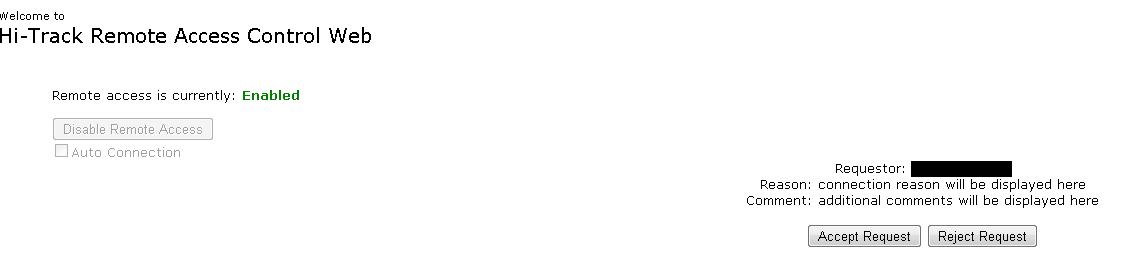
|