

| Hitachi Data Systems Hitachi, Ltd. | |
|
|
|
User ManagementThe Hi-Track RACC application manages users and their identity using either the local repository that comes with the RACC application or a network shared active directory. Local Repository The RACC application comes preconfigured with a local repository that stores and manages users� information and credentials. It also comes with a single predefined user- the Administrator. Logged in as administrator, you have access to all functions and areas of the application. 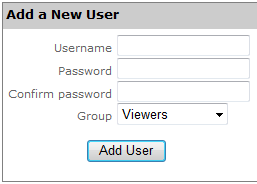
If desired, you can change the RACC�s setting to authenticate users using an active directory. This can be accomplished by going to the configuration page and completing the User Identity Management panel. Moreover, if you want additional users, you may create user accounts for them and assign them an appropriate level of access to the RACC application. There are three defined user groups in Hi-Track RACC. These are:
Members of the Viewers group do not have permissions sufficient to change anything in the application. They can only view the current status, current configuration, or view log files. However they cannot view the User Mgmt page or see a list of defined users. Members of the Users group can also view status and configuration information, but they can also enable and disable polling (including terminating an open connection). Only members of the Administrators group can specify configuration information or perform User Mgmt functions such as adding users or changing passwords. Add a New User Adding a user is a simple operation. Navigate to the User Mgmt page and type the new user's username and password in the provided fields. Select the appropriate group for the user, and click Add User. Users can change their own passwords after they have logged in. However as Administrator, you can also change any user's password. On the User Mgmt page, just click the link next to the user labeled change password. To change a user's access level, delete the user and re-add them with the appropriate group selected for them.
Active Directory An administrator can configure the RACC application to employ an existing Active directory for managing users. To successfully take advantage of this feature in the RACC system, the following two conditions need to be met:
Assuming these conditions are satisfied, the RACC queries the Active Directory to validate users and retrieve their group membership. Lastly, it is important to realize that the RACC application binds to the Active Directory to perform read-only operations. Therefore, members of the administrators group cannot perform user management tasks such as adding users or changing passwords. |